Skip to content

Engineer Factory · The DAW

Record, edit, mix, export

Engineer Factory is a professional DAW for Windows with a native C++ audio engine, VST3 hosting and 17 built-in plug-ins. The download is free, and you do not need an account for it.

Version 1.4.0 · 79 MB · Windows 10 & 11, 64-bit

Free, no account needed. Engineer Factory AI is part of the same download.

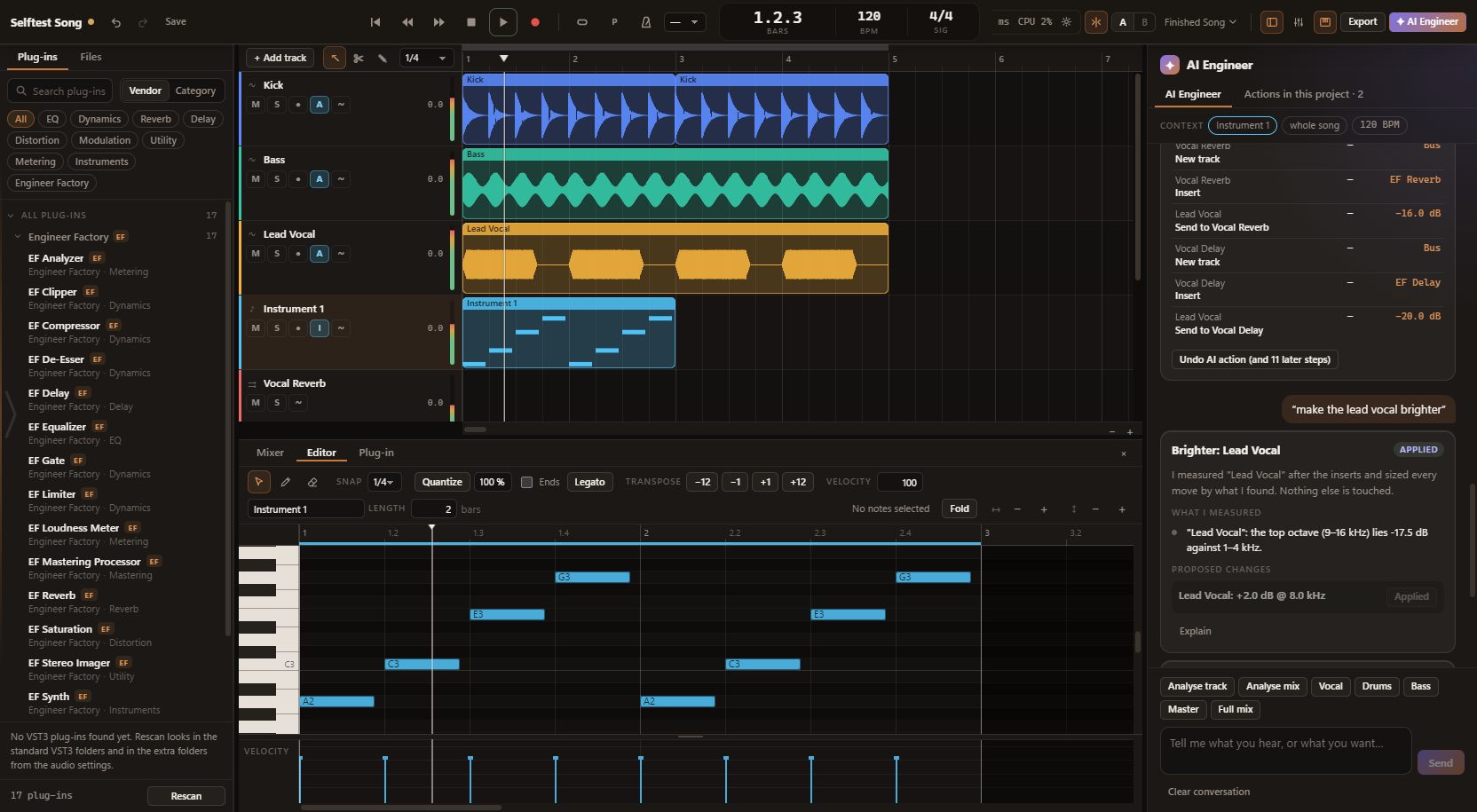
The Engineer Factory arrangement window with audio tracks, the plug-in browser and the mixer

Audio engine

A native engine that runs as its own process

The audio engine is written in C++ and runs apart from the interface: audio never shares a thread with the window. If a plug-in takes the engine down, the window and your unsaved project survive - the engine restarts and names the plug-in that was loading.

  • Windows Audio (WASAPI) in shared, exclusive and low-latency mode, plus DirectSound
  • Choose the device, sample rate, buffer size and input channels
  • Latency read-out and test tone
  • Survives a change of audio device

What the DAW does

Everything on this page is implemented and part of the current download.

Recording & editing

Record audio and MIDI, choose takes, edit clips non-destructively.

  • Audio and MIDI recording with count-in, metronome and punch in/out
  • Loop recording with takes - you choose the take per clip
  • Recordings are placed with latency compensation
  • Non-destructive: undo removes the clip, never the file
  • Move, trim, split, duplicate, slip, copy and paste clips
  • Clip gain, fades with three curves, and crossfades
  • Snap and grid including triplets, markers, loop range, time selection and zoom
  • Audio, instrument, bus, folder and master tracks with no artificial track limit
  • Track colours, mute and solo, record arm, input monitoring (off, on, auto) and polarity

MIDI

Piano roll, quantize and a built-in synth, so something sounds straight away.

  • Piano roll with draw, erase and select tools
  • Velocity lane
  • Quantize with strength and note ends, legato and transpose
  • Fold view and note audition
  • MIDI file import
  • Built-in synthesizer: an instrument track sounds immediately

Mixer & routing

Faders, sends, buses and loudness metering on the master.

  • Fader, pan and inserts on every channel
  • Sends, pre or post
  • Buses and routing with loop protection
  • Solo keeps the signal path audible
  • Stereo meters with peak and RMS
  • Master loudness: momentary, short-term and integrated LUFS, true peak and correlation

Automation

Volume, pan, sends and plug-in parameters - in four modes.

  • Automation for volume, pan, send level and plug-in parameters
  • Read, touch, latch and write modes
  • Automation curves are latency-compensated

Plug-in hosting

VST3 with automatic delay compensation and a scan no plug-in can take down.

  • VST3 hosting with automatic plug-in delay compensation
  • Every plug-in is scanned in its own process - a crashing plug-in cannot take the scan down
  • Plug-in browser with search, categories, favourites and recently used
  • 17 built-in plug-ins at no extra cost
  • VST2 and AU are not supported

Export & mastering

WAV, FLAC and OGG Vorbis, normalised to a loudness target.

  • WAV at 16-bit, 24-bit or 32-bit float, FLAC and OGG Vorbis
  • Sample-rate conversion and dither
  • Normalisation to a loudness target or a true-peak value - never above -1 dBTP
  • Tail for reverb
  • Export tracks as separate files

Projects & safety

Atomic saving, automatic backups, autosave and crash recovery.

  • Its own project format with atomic saving
  • Automatic backups of earlier versions
  • Autosave and crash recovery
  • Recent projects
  • Imported audio can be copied into the project folder
  • Undo and redo history for all editing
  • Command bar (Ctrl+K) and keyboard shortcuts for the whole application

AI Engineer

And when you want help: the AI Engineer

The DAW is fully usable without the AI Engineer. With Engineer Factory Pro it measures your tracks and proposes changes that you apply one by one and take back again.

See the AI Engineer

System requirements

  • Windows 10 or 11, 64-bit
  • An audio device through Windows Audio (WASAPI) or DirectSound
  • Interface in English and German
  • One installer - Engineer Factory AI is part of it
  • No account needed. You only need an account for Engineer Factory Pro

What is not there yet

So you know where you stand before you download:

  • macOS
  • ASIO
  • MP3 export
  • Tempo changes within a song, and time-stretching
  • Side-chain routing between tracks
  • Video
  • The built-in plug-ins as separate VST3s for other DAWs

Current version

Engineer Factory Version 1.4.0

18 September 2026

Download Engineer Factory

Free for Windows 10 and 11. No account needed.

Version 1.4.0 · 79 MB · Windows 10 & 11, 64-bit

Free, no account needed. Engineer Factory AI is part of the same download.